ESP-IDF Tutorial

This section provides a step-by-step guide to assist in creating and understanding the key points of a basic Safe DDS application using the ESP-IDF environment.
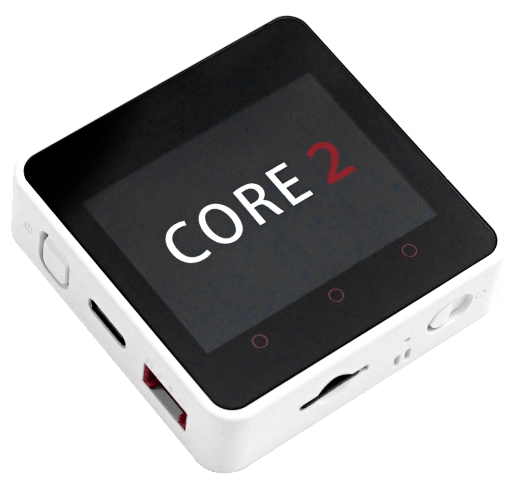
This project has been tested on the M5STACK Core2 board (ESP32 D0WDQ6-V3) with ESP-IDF v5.3.2 inside the official Espressif Docker container. Check Supported platforms for more information.
Note
This guide might require adaptations to work with a different hardware, RTOS, network stack or ESP-IDF version.
In order to get support please contact support@eProsima.com.
Note
It is recommended to first read the Getting Started section to gain a better understanding of the basic concepts and terminology used in this section.
Project Configuration
This section describes how to configure an ESP-IDF project that uses the Safe DDS library. For this tutorial, ESP-IDF will be used through the command line interface.
Note
Remember to source the ESP-IDF environment for the idf.py commands to work.
# Path in the Espresif Docker container:
source /opt/esp/idf/export.sh
# Generically:
source /path/to/esp-idf/export.sh
1. Create a new project
Start by creating a new project in ESP-IDF for the target device. Rename safedds_app.c to safedds_app.cpp, as this will be a C++ project.
Then, create a components folder inside the project directory.
# Create a new project
idf.py create-project safedds_app
cd safedds_app
# Rename the main file
mv main/safedds_app.c main/safedds_app.cpp
# Set the target device
idf.py set-target esp32
# Create the components folder
mkdir components
2. Add Safe DDS to the project
Navigate to the ESP-IDF support package folder and run the create_package.sh script followed by the path to the Safe DDS source release folder. This script generates the required files for a FreeRTOS + LwIP application on an ESP-IDF environment.
Copy the generated safedds_espidf folder to the components folder of the project.
Safe DDS application
After the project has been set up, the next step is to create a Safe DDS application:
1. Add the application files to the project
Navigate to the tutorial_esp_idf folder.
Add the provided SafeDDSApp.cpp file to the main folder of the project.
Add the provided SafeDDSApp.hpp, Locator.hpp, and HelloWorldTypeSupport.hpp files to a folder named include inside the main folder of the project.
2. Configure the Safe DDS application
With all Safe DDS files in place, the application can be written as follows.
Connect to a WiFi network or initialize the desired transport.
Make the Safe DDS task wait until the device has an assigned IP address.
Create the Safe DDS task, which, in this example, creates a SafeDDSApp object and spins it forever.
#include <stdio.h>
#include <freertos/FreeRTOS.h>
#include <freertos/task.h>
#include <Locator.hpp>

#define SAFEDDS_TASK_STACK_SIZE 8192
#define SAFEDDS_TASK_PRIORITY 4

void safedds_app_init(void* arg);

extern "C" void app_main(void)
{
    // ...
    // Set credentials and connect to WiFi
    // ...

    // Create locator with assigned IP address and desired port
    Locator locator;
    locator.ip_address = ip_address;
    locator.port = 8000;

    // Launch sample app
    xTaskCreate(safedds_app_init, "SafeDDSApp", SAFEDDS_TASK_STACK_SIZE, (void*)&locator, SAFEDDS_TASK_PRIORITY, NULL);

    // Wait forever
    vTaskDelay(portMAX_DELAY);
}
3. Configure the CMake files
Once all files are in place, the CMake build system can be configured.
The CMakeLists.txt file in the main folder shall be modified to include the new source files and define the Safe DDS task stack size.
file(GLOB_RECURSE C_SOURCES *.c)
file(GLOB_RECURSE CPP_SOURCES *.cpp)

idf_component_register(
    SRCS
        ${C_SOURCES}
        ${CPP_SOURCES}
    INCLUDE_DIRS
        "."
        "include"
)
Running the application
Build and flash the application to the device using the ESP-IDF commands:
idf.py build flash monitor
Run the Getting Started example in a local machine on the same network as the device. The console output should show messages similar to the following:
[DW: 0] Message: HelloWorld with index: 6
[DW: 16777216] Message: Hello World from ESP32! with index: 9
[DW: 0] Message: HelloWorld with index: 7
[DW: 16777216] Message: Hello World from ESP32! with index: 10
[DW: 16777216] Message: Hello World from ESP32! with index: 11
[DW: 0] Message: HelloWorld with index: 8
[DW: 16777216] Message: Hello World from ESP32! with index: 12
[DW: 16777216] Message: Hello World from ESP32! with index: 13
[DW: 0] Message: HelloWorld with index: 9
[DW: 16777216] Message: Hello World from ESP32! with index: 14